
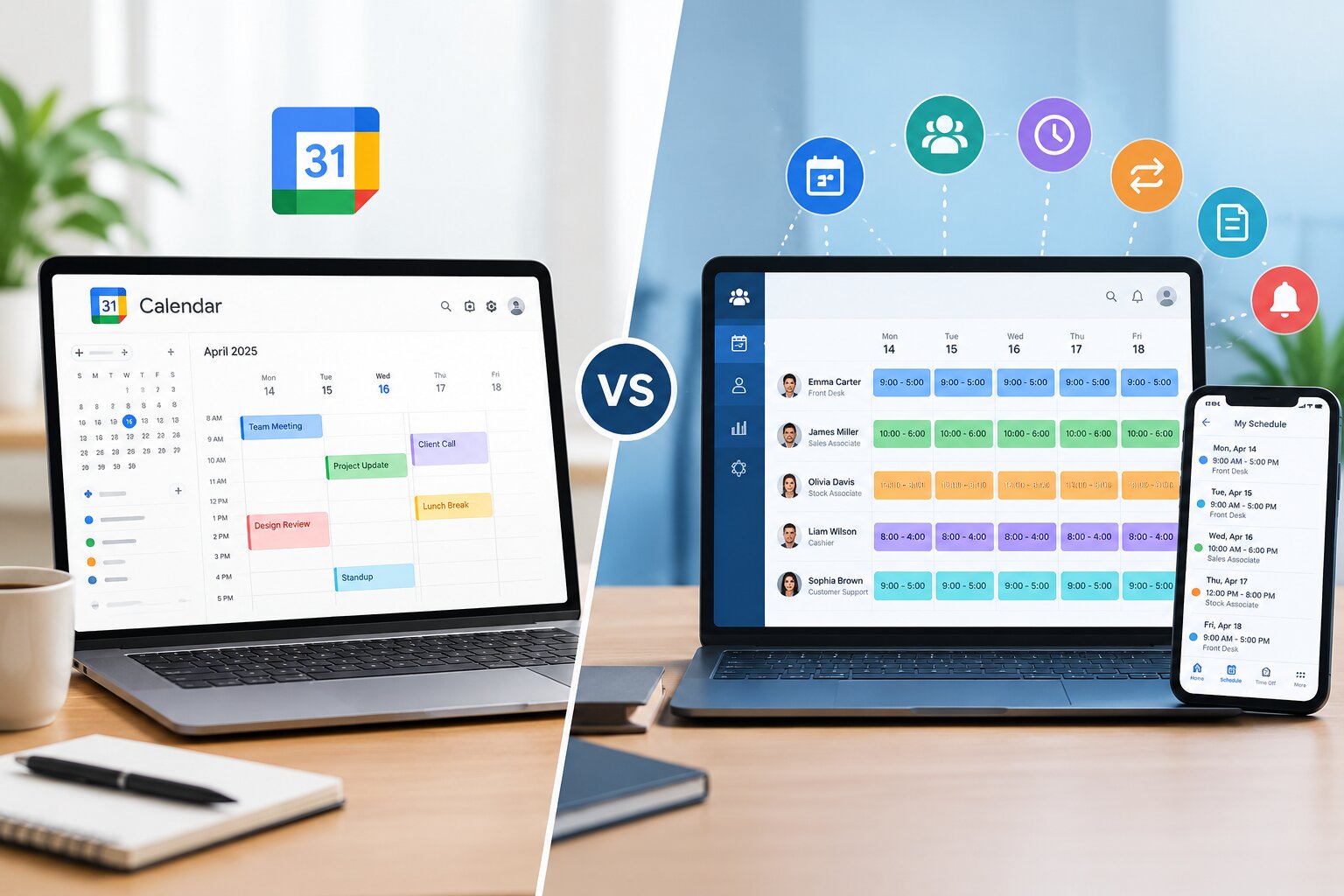
Managing employee schedules may seem simple when a business has only a few workers. However, as teams grow, scheduling becomes more complex. Managers must coordinate shifts, track employee availability, handle time-off requests, manage last-minute changes, monitor overtime, and ensure adequate staffing.
Many businesses initially use Google Calendar for scheduling because it is familiar, easy to access, and simple to share. However, as workforce scheduling needs increase, a basic calendar may no longer provide the features required to manage employees efficiently.
This raises an important question:
Google Calendar vs. employee scheduling software: what’s the difference, and which one is better for your business?
While both tools can help organize schedules, they are designed for very different purposes. Google Calendar is a general calendar and event management tool, whereas employee scheduling software is specifically designed to manage workforce schedules, shifts, availability, communication, and labor planning.
This guide explains the key differences between Google Calendar and employee scheduling software, helping businesses choose the right solution for their scheduling needs.
What Is Google Calendar?
Google Calendar is a digital calendar tool that allows users to create events, schedule appointments, set reminders, and share calendars with others.
Businesses often use Google Calendar to organize:
- Meetings
- Appointments
- Project deadlines
- Events
- Team activities
- Basic employee schedules
For a small team, managers can create calendar events representing employee shifts. For example:
- Morning Shift: 8:00 AM–4:00 PM
- Evening Shift: 4:00 PM–12:00 AM
- Employee Meeting
- Training Session
Employees can then view the shared calendar and see when they are scheduled to work.
Google Calendar can be useful for simple scheduling situations. However, it was not specifically designed to manage employee shifts or workforce operations.
As scheduling requirements become more complex, businesses may need a dedicated employee scheduling software solution.
What Is Employee Scheduling Software?
Employee scheduling software is a workforce management tool designed specifically to help businesses create, manage, and communicate employee schedules.
Instead of simply adding events to a calendar, managers can use scheduling software to organize employees, departments, locations, positions, shifts, and work hours.
Depending on the platform, employee scheduling software may include features such as:
- Drag-and-drop schedule creation
- Employee availability management
- Shift templates
- Open shift management
- Shift swapping
- Time-off requests
- Automatic notifications
- Mobile scheduling access
- Overtime monitoring
- Conflict detection
- Labor forecasting
- Attendance tracking
- Time clock integration
- Employee communication tools
The primary purpose of employee scheduling software is to make workforce scheduling faster, more accurate, and easier to manage.
Google Calendar vs. Employee Scheduling Software: A Quick Comparison
| Feature | Google Calendar | Employee Scheduling Software |
|---|---|---|
| Basic calendar management | Yes | Yes |
| Employee shift scheduling | Limited | Yes |
| Drag-and-drop scheduling | Basic | Advanced |
| Employee availability tracking | Manual | Built-in |
| Shift swapping | Manual | Often automated |
| Time-off requests | Manual | Built-in |
| Open shifts | Limited | Yes |
| Schedule conflict detection | Limited | Advanced |
| Overtime tracking | No or limited | Yes |
| Employee notifications | Basic | Automated |
| Mobile access | Yes | Yes |
| Team communication | Limited | Often included |
| Labor management | No | Yes |
| Reporting and analytics | Limited | Advanced |
| Designed specifically for workforce scheduling | No | Yes |
The biggest difference is simple:
Google Calendar is designed for managing events and appointments, while employee scheduling software is designed for managing employees and work shifts.
1. Purpose and Functionality
Google Calendar
Google Calendar is primarily designed to organize time.
Users can create events, invite people, set reminders, and share calendars. It works well for managing meetings, appointments, deadlines, and personal schedules.
For example, a manager could create calendar events such as:
- John – Morning Shift
- Sarah – Evening Shift
- Weekly Team Meeting
- Staff Training
This approach can work for small teams with predictable schedules.
However, as more employees are added, manually creating and updating individual calendar events can become time-consuming.
Employee Scheduling Software
Employee scheduling software is built specifically for workforce scheduling.
Managers can typically create schedules based on:
- Employee availability
- Job roles
- Skills
- Departments
- Locations
- Labor requirements
- Working hours
- Shift patterns
The system is designed to answer important workforce questions, such as:
- Who is available to work?
- Who is already scheduled?
- Are there scheduling conflicts?
- Does the shift have enough employees?
- Has an employee exceeded their scheduled hours?
- Who can cover an open shift?
This makes employee scheduling software more suitable for businesses with complex scheduling requirements.
2. Creating Employee Schedules
Scheduling With Google Calendar
Creating an employee schedule in Google Calendar generally requires managers to manually create events.
For example, if five employees are working different shifts, the manager may need to create multiple calendar entries.
A weekly schedule could involve dozens of individual events.
If the schedule changes, those events must also be manually updated.
This process can become challenging when managing:
- Multiple shifts
- Large teams
- Multiple locations
- Different departments
- Rotating schedules
The more employees and shifts involved, the more difficult manual calendar scheduling can become.
Scheduling With Employee Scheduling Software
Employee scheduling software is designed to simplify schedule creation.
Many platforms provide a visual scheduling dashboard where managers can:
- Select employees
- Assign shifts
- Copy previous schedules
- Use schedule templates
- Drag and drop shifts
- Duplicate recurring schedules
This can significantly reduce the amount of time required to create weekly or monthly schedules.
For example, instead of manually entering every shift, a manager may be able to reuse a previous week’s schedule and make only the necessary adjustments.
This is particularly helpful for businesses with recurring work patterns.
3. Employee Availability Management
Employee availability is one of the biggest challenges in workforce scheduling.
Employees may have:
- Preferred working hours
- School commitments
- Family responsibilities
- Other jobs
- Temporary availability changes
Google Calendar and Availability
Google Calendar allows users to manage their personal calendars, but it does not provide a dedicated workforce availability management system.
Managers may need to collect availability through:
- Emails
- Messages
- Spreadsheets
- Forms
- Phone calls
The manager must then manually consider that information when creating the schedule.
This increases the risk of accidentally scheduling an employee when they are unavailable.
Employee Scheduling Software and Availability
Dedicated scheduling software typically allows employees to submit their availability directly through the system.
Employees may be able to indicate:
- Available days
- Preferred shifts
- Unavailable hours
- Recurring availability
- Temporary schedule restrictions
Managers can then view employee availability while creating the schedule.
This helps reduce scheduling conflicts and improves scheduling accuracy.
4. Handling Scheduling Conflicts
Scheduling conflicts can occur when:
- An employee is scheduled when unavailable.
- An employee is assigned overlapping shifts.
- Too few employees are scheduled.
- Too many employees are scheduled.
- An employee exceeds allowed working hours.
Google Calendar
Google Calendar can help identify certain time conflicts, but it is not specifically designed to detect workforce scheduling problems.
Managers may need to manually check whether:
- Employees have overlapping shifts.
- Enough employees are assigned.
- Employees are available.
- Working hours are evenly distributed.
As the team grows, manually reviewing schedules becomes more difficult.
Employee Scheduling Software
Employee scheduling platforms often include tools designed to reduce scheduling conflicts.
Depending on the system, managers may receive alerts when:
- An employee is scheduled twice.
- Shifts overlap.
- An employee is unavailable.
- Scheduled hours exceed a limit.
- Overtime may occur.
These features help managers identify problems before publishing the schedule.
Also Read : How to Reduce Employee Scheduling Conflicts in the Workplace
5. Shift Swapping
Employees occasionally need to change their shifts because of personal commitments, emergencies, or unexpected circumstances.
Shift Swapping With Google Calendar
Google Calendar does not provide a dedicated employee shift-swapping process.
Employees may need to:
- Contact another employee.
- Ask them to cover the shift.
- Inform the manager.
- Wait for approval.
- Have the schedule manually updated.
This process can involve multiple messages and increase administrative work.
Managers may also lose track of whether the schedule has been updated correctly.
Shift Swapping With Employee Scheduling Software
Employee scheduling software can simplify the shift-swapping process.
Depending on the platform, employees may be able to:
- Request a shift swap.
- Offer a shift to other employees.
- Claim available shifts.
- Request management approval.
Managers can review the request before approving the change.
Once approved, the schedule can automatically update.
This creates a more organized process and reduces unnecessary communication.
Eplore Employee Shift Swapping: Best Practices for Managers and Employees
6. Managing Last-Minute Schedule Changes
Unexpected schedule changes are common in many workplaces.
Employees may:
- Call in sick.
- Experience emergencies.
- Request time off.
- Arrive late.
- Become unavailable.
When these situations occur, managers need to quickly find someone who can cover the shift.
Google Calendar
With Google Calendar, managers may need to:
- Identify the affected shift.
- Check who may be available.
- Contact multiple employees.
- Find a replacement.
- Update the calendar.
- Notify the team.
This can take time, particularly during busy work periods.
Employee Scheduling Software
Scheduling software can make last-minute changes easier to manage.
Managers may be able to:
- Identify available employees.
- Create an open shift.
- Notify qualified employees.
- Allow employees to claim the shift.
- Update the schedule immediately.
Automatic notifications can help employees receive updates quickly.
This is particularly useful for businesses that operate with multiple shifts.
Also Read : How to Manage Last-Minute Shift Changes Without Disrupting Operations
7. Time-Off Request Management
Managing employee time-off requests is another important part of workforce scheduling.
Employees may request:
- Vacation days
- Personal leave
- Sick leave
- Family leave
- Other approved absences
Google Calendar
With Google Calendar, time-off requests are often handled outside the calendar.
Employees may submit requests through:
- Messaging apps
- Paper forms
- HR systems
Managers must manually remember approved requests when creating schedules.
If information is missed, an employee may accidentally be scheduled during approved leave.
Employee Scheduling Software
Many employee scheduling systems include built-in time-off management.
Employees can submit requests directly through the platform.
Managers can then:
- Review requests.
- Approve or decline them.
- View upcoming absences.
- Consider approved leave when scheduling employees.
This helps centralize scheduling information.
Instead of checking multiple emails and messages, managers can access relevant information from one system.
8. Employee Notifications and Communication
Communication is essential when managing employee schedules.
Employees need to know:
- When they are working.
- Whether their shifts have changed.
- If a shift is available.
- Whether a request has been approved.
Google Calendar
Google Calendar can send notifications and event reminders.
Employees can also receive updates when calendar events change.
However, communication is generally centered around calendar events.
For more detailed workforce communication, businesses may still need separate tools such as:
- Messaging apps
- Team communication platforms
Employee Scheduling Software
Scheduling software often provides workforce-specific notifications.
Employees may receive alerts when:
- A new schedule is published.
- A shift changes.
- A shift swap is requested.
- A shift swap is approved.
- An open shift becomes available.
- A time-off request is approved.
Centralized communication can reduce confusion and help employees stay informed.
9. Overtime Management
Overtime can significantly affect labor costs.
Without proper scheduling, employees may accidentally work more hours than planned.
Google Calendar
Google Calendar does not provide dedicated overtime tracking.
Managers may need to manually calculate:
- Scheduled hours
- Weekly hours
- Additional shifts
- Overtime risk
This can become difficult when schedules frequently change.
Employee Scheduling Software
Employee scheduling software may provide tools for monitoring scheduled hours.
Managers can identify employees who are approaching overtime limits and make schedule adjustments.
This can help businesses:
- Control labor costs.
- Distribute work more evenly.
- Reduce unnecessary overtime.
- Improve workforce planning.
Explore How to Manage Employee Overtime Through Better Scheduling
10. Managing Multiple Locations
Businesses with multiple locations face additional scheduling challenges.
For example, a company may operate:
- Multiple retail stores
- Several restaurants
- Different offices
- Multiple warehouses
- Regional service locations
Google Calendar
Managers can create separate calendars for different locations.
However, coordinating employees across multiple locations can become complicated.
Managers may need to manually track:
- Employee assignments
- Location schedules
- Available workers
- Shift coverage
Employee Scheduling Software
Many workforce scheduling platforms allow managers to organize schedules by:
- Location
- Department
- Team
- Position
- Job role
This provides a clearer overview of workforce operations.
Managers can quickly switch between locations or review staffing requirements across the organization.
11. Employee Access and Self-Service
Modern employees increasingly expect convenient access to their work schedules.
Google Calendar
Employees can access Google Calendar from:
- Smartphones
- Tablets
- Desktop computers
They can view shared calendars and receive reminders.
However, employee self-service features are limited for workforce scheduling.
For example, Google Calendar does not provide a complete system specifically for employees to:
- Submit availability.
- Request time off.
- Swap shifts.
- Claim open shifts.
Employee Scheduling Software
Employee scheduling software often includes self-service features through web or mobile applications.
Employees may be able to:
- View schedules.
- Update availability.
- Request time off.
- Swap shifts.
- Claim open shifts.
- Receive notifications.
Self-service tools can reduce the administrative workload for managers.
12. Reporting and Workforce Insights
Business managers often need information about workforce scheduling.
They may want to understand:
- How many hours employees are scheduled.
- Which shifts require more staff.
- Whether overtime is increasing.
- Which employees are working the most hours.
- Where staffing shortages occur.
Google Calendar
Google Calendar is not designed to provide workforce reporting or scheduling analytics.
Managers may need to export information or maintain separate spreadsheets.
Employee Scheduling Software
Scheduling platforms may include reporting and analytics features.
These reports can help managers identify scheduling patterns and improve workforce planning.
For example, managers may identify:
- Frequently understaffed shifts.
- Excessive overtime.
- High-demand periods.
- Staffing gaps.
Better scheduling insights can help businesses make more informed decisions.
13. Scalability
Scalability is one of the most important differences between Google Calendar and employee scheduling software.
Google Calendar for Small Teams
Google Calendar can work reasonably well for:
- Very small businesses
- Small teams
- Simple schedules
- Fixed working hours
- Businesses with few scheduling changes
For example, a small office where everyone works from 9 AM to 5 PM may not need advanced scheduling tools.
Employee Scheduling Software for Growing Businesses
As businesses grow, scheduling becomes more complicated.
Dedicated scheduling software is better suited for businesses with:
- Large teams
- Shift workers
- Multiple locations
- Rotating schedules
- Frequent schedule changes
- Part-time employees
- Variable availability
The ability to manage more employees without significantly increasing administrative work makes scheduling software more scalable.
When Should You Use Google Calendar for Employee Scheduling?
Google Calendar may be sufficient when your scheduling requirements are simple.
It can be a practical option if:
- You have a small team.
- Employees work fixed hours.
- There are few schedule changes.
- You do not manage multiple shifts.
- You do not need overtime tracking.
- You only need employees to view a schedule.
For very basic scheduling, a shared calendar can provide an easy and familiar solution.
However, businesses should recognize the limitations of using a general-purpose calendar for workforce management.
When Should You Use Employee Scheduling Software?
Employee scheduling software is usually a better choice when scheduling requires more organization and automation.
Consider dedicated scheduling software if your business:
- Manages multiple employees.
- Uses shift-based schedules.
- Experiences frequent schedule changes.
- Needs to track employee availability.
- Handles regular shift swaps.
- Manages time-off requests.
- Wants to reduce overtime.
- Operates multiple locations.
- Needs automated notifications.
- Wants to reduce scheduling conflicts.
The more complex the scheduling process becomes, the greater the value of a dedicated employee scheduling system.
Key Benefits of Employee Scheduling Software
Businesses can benefit from scheduling software in several ways.
1. Saves Administrative Time
Automated scheduling features can reduce the amount of manual work required to create and update schedules.
Managers can spend less time organizing shifts and more time focusing on other responsibilities.
2. Reduces Scheduling Errors
Availability tracking and conflict alerts can help prevent common scheduling mistakes.
This reduces situations where employees are accidentally:
- Scheduled twice
- Scheduled when unavailable
- Assigned overlapping shifts
3. Improves Employee Communication
Automated notifications help employees stay informed about schedule changes.
Employees can access current schedules without constantly contacting their manager.
4. Supports Better Workforce Planning
Scheduling tools provide a clearer view of staffing requirements.
Managers can identify potential gaps before they become operational problems.
5. Helps Control Labor Costs
By monitoring employee hours and overtime, businesses can make more informed scheduling decisions.
Better planning may help reduce unnecessary labor expenses.
Are There Any Disadvantages of Employee Scheduling Software?
While employee scheduling software provides many benefits, businesses should also consider potential challenges.
These may include:
- Subscription costs
- Employee training
- Setup time
- Integration requirements
- Choosing the right platform
However, for businesses with complex schedules, the time saved through automation may outweigh these challenges.
The key is selecting a scheduling solution that matches the size and needs of the business.
Google Calendar vs. Employee Scheduling Software: Which Is Better?
There is no single answer for every business.
The right choice depends on the complexity of your scheduling needs.
Choose Google Calendar if:
- Your team is small.
- Work schedules are simple.
- Employees have predictable working hours.
- Schedule changes are rare.
- You primarily need a shared calendar.
Choose employee scheduling software if:
- You manage multiple employees.
- Your business operates with shifts.
- Employee availability changes frequently.
- Shift swapping is common.
- You need time-off management.
- You want to monitor overtime.
- You need automated notifications.
- You manage multiple locations.
For simple calendar management, Google Calendar can be effective.
For workforce management, employee scheduling software provides more specialized tools.
How to Transition From Google Calendar to Employee Scheduling Software
Businesses that currently use Google Calendar do not necessarily need to change their entire process overnight.
A gradual transition can make implementation easier.
Step 1: Identify Your Scheduling Challenges
Start by identifying the problems with your current process.
For example:
- Are managers spending too much time creating schedules?
- Are employees missing schedule updates?
- Are shift conflicts common?
- Is overtime difficult to track?
- Are last-minute changes causing problems?
Understanding these challenges will help identify the features you need.
Step 2: List Required Features
Create a list of essential features.
These may include:
- Employee availability
- Shift swapping
- Mobile access
- Automated notifications
- Time-off requests
- Overtime tracking
Avoid choosing software simply because it has the largest number of features.
Instead, focus on tools that solve your specific scheduling problems.
Step 3: Train Managers and Employees
Successful implementation depends on employee adoption.
Managers and employees should understand how to:
- Access schedules.
- Update availability.
- Request time off.
- Respond to schedule changes.
Clear communication during implementation can make the transition smoother.
Step 4: Establish Clear Scheduling Policies
Technology works best when supported by clear workplace policies.
Businesses should establish guidelines for:
- Schedule publication
- Shift swapping
- Time-off requests
- Availability updates
- Last-minute changes
Clear policies help employees understand their responsibilities.
Best Practices for Effective Employee Scheduling
Whether you use Google Calendar or dedicated scheduling software, following good scheduling practices can improve operations.
Publish Schedules in Advance
Whenever possible, provide employees with schedules early.
This gives employees time to plan personal commitments and identify potential conflicts.
Keep Employee Availability Updated
Encourage employees to regularly update their availability.
Accurate availability information helps prevent scheduling conflicts.
Avoid Unnecessary Last-Minute Changes
Last-minute schedule changes can create stress and confusion.
While emergencies cannot always be avoided, better workforce planning can reduce unnecessary changes.
Use Clear Communication
Employees should always know where to find the latest schedule.
Businesses should also establish a clear process for communicating urgent changes.
Monitor Employee Workloads
Avoid consistently assigning excessive hours to the same employees.
Balanced schedules can help improve fairness and reduce burnout.
Frequently Asked Questions
Can Google Calendar be used for employee scheduling?
Yes. Google Calendar can be used for basic employee scheduling, particularly for small teams with simple and predictable work schedules. Managers can create shared calendars and add shifts as calendar events.
However, it does not provide many workforce-specific features such as availability management, shift swapping, overtime monitoring, and time-off workflows.
What is the main difference between Google Calendar and employee scheduling software?
The main difference is their purpose.
Google Calendar is designed for managing events, appointments, and general calendars.
Employee scheduling software is specifically designed to manage employees, work shifts, availability, schedule changes, and workforce planning.
Is Google Calendar free for employee scheduling?
Google Calendar can be used as a basic scheduling tool without dedicated workforce scheduling features. However, businesses should consider whether a simple calendar provides enough functionality for their workforce management needs.
Is employee scheduling software worth it?
Employee scheduling software can be valuable for businesses with complex scheduling requirements.
The benefits may include reduced administrative work, fewer scheduling conflicts, improved communication, better overtime management, and more efficient workforce planning.
Can employee scheduling software reduce scheduling conflicts?
Yes. Many employee scheduling platforms provide availability tracking and conflict detection features.
These tools can help managers identify potential problems before publishing schedules.
Is employee scheduling software suitable for small businesses?
Yes. Small businesses can also benefit from scheduling software, especially if they manage shift workers, part-time employees, or frequently changing schedules.
However, businesses with very simple and fixed schedules may find a shared calendar sufficient.
Final Thoughts
When comparing Google Calendar vs. employee scheduling software, the biggest difference is that they serve different purposes.
Google Calendar is a useful tool for organizing events, meetings, appointments, and basic schedules. It can work well for small businesses with simple workforce requirements.
However, managing employees involves much more than placing shifts on a calendar.
Businesses may also need to manage:
- Employee availability
- Shift swaps
- Time-off requests
- Schedule conflicts
- Last-minute changes
- Overtime
- Employee notifications
- Multiple locations
Employee scheduling software is specifically designed to handle these workforce management challenges.
For businesses with growing teams or complex shift schedules, switching from a general calendar to a dedicated scheduling platform can save time, reduce scheduling errors, and improve communication.
Ultimately, the best choice depends on the size of your workforce and the complexity of your scheduling process. If your scheduling needs are simple, Google Calendar may be enough. But if managing employee schedules is becoming increasingly time-consuming, dedicated employee scheduling software may provide a more efficient and scalable solution.
Recent Posts
- Time and Attendance Software: Complete Guide for Employers
- Time and Attendance: What’s the Difference Between the Two?
- How to Reduce Timesheet Errors and Improve Payroll Accuracy
- Timesheet App for Employees: Features, Benefits & Best Practices
- Timesheet Software vs. Excel: Which Is Better for Businesses?
Stay Ahead. Simplify Workforce Management.
Empower your teams to work efficiently with a unified workforce platform built for clarity, control, and actionable insights across your organization.